SharePoint to PostgreSQL
Your SharePoint lists, as PostgreSQL tables
Query the projects, assets and requests your organisation keeps in SharePoint with plain SQL. SPSync writes your lists, and the custom columns of your document libraries, into Postgres tables and keeps them current on a schedule. Your application, or an agent's SQL tool, never has to call Microsoft Graph itself.
Last updated
One way: SharePoint stays the system of record, and SPSync keeps a read-only copy of your lists current in PostgreSQL.
Chapters are in the video's description.
Watch the SharePoint-to-PostgreSQL walkthrough: the SharePoint lists and their column types, connecting to Microsoft 365, picking lists, the empty database in pgAdmin, the run, and the replicated tables in pgAdmin.
A typical request
"Can the new app read the project list?"
Your team is building an internal tool on Postgres. Half the data it needs, the projects, the clients, who owns what, is maintained by the business in SharePoint lists and is not moving anywhere. The obvious route is to call Graph from the application.
That route gets long quickly. You need an app registration and token handling, paging for long lists, Retry-After handling when Graph throttles you, and code that turns lookup ids and multi-person fields into something you can join. Every page load that touches SharePoint data now depends on a service you do not control.
With a replica, the application reads Postgres like any other table, and SPSync deals with Graph on its own schedule.
The schema
What your queries will see
Every list becomes a table with a stable primary key on the SharePoint item id. A lookup column becomes an id column you join on yourself, and SPSync does not declare foreign key constraints, so a run never fails because a parent row arrived a moment after its child. Multi-choice columns get their own child tables, one row per value. People resolve to a single users table.
Items deleted in SharePoint stay in the table with a deletion flag, which your queries can filter on. The command-line tool can switch a replication to hard delete if you would rather the table matched SharePoint row for row.
The schema follows the list. A new column appears on the next run. A column someone
removes stays where it is, and a retyped column gets a _v2 twin so your
existing queries keep returning what they did yesterday. Generated reporting views
give a flattened shape per list for anyone who wants to skip the joins.
The tables use standard Postgres types. No extension is needed to read them, and large lists are paged past SharePoint's 5,000-item view threshold on the way in. The schema reference has the column-by-column type mapping.
Agents and chat tools
A Postgres MCP server over the copy
The copy is plain Postgres, so the tools your team already runs against Postgres
work on it. Create a login for the agent, grant it SELECT on the tables
or views its job needs, and point a Postgres MCP server or a text-to-SQL tool at the
database. The agent describes the tables, writes a join across lists that SharePoint
cannot join, and never holds a Graph permission. SPSync's own read-only MCP server,
spsync mcp serve, works over the same copy.
SharePoint item permissions are not copied, so row-level security on the replica is where you narrow what one agent sees. For questions about wording rather than values, add Postgres with pgvector as a second destination; SPSync writes one embedding per row there on each sync. An agent data layer for SharePoint costs a three-list question against Graph and against the replica, and SharePoint lists in AI frameworks points LangChain, LlamaIndex, CrewAI and n8n at this copy. SharePoint and PostgreSQL two-way sync, what works today answers the next question most readers have.
Set up PostgreSQL
Sign in to SharePoint with the SharePoint connection guide, then follow the PostgreSQL setup guide to create the database user and open the connection for PostgreSQL. If the connection test fails, the troubleshooting guide lists the errors people hit and what fixes them.
Script it
Everything you can click, you can script. The CLI, YAML config and automation below reproduce this scenario exactly. See the CLI reference.
spsync auth login --client-id 00000000-0000-0000-0000-000000000000
spsync export-config --output replication.yaml --pipeline-name postgresql --prefix postgresql --destination-kind postgres --connection-string-env SPSYNC_DB_CONNECTION --dataset-name postgresql --client-id 00000000-0000-0000-0000-000000000000 --site-url https://contoso.sharepoint.com/sites/example --all-lists
spsync doctor replication.yaml
spsync run replication.yaml
pipeline_name: postgresql
prefix: postgresql
auth:
mode: delegated
client_id: 00000000-0000-0000-0000-000000000000
tenant_id: common
destination:
kind: postgres
connection_string_env: SPSYNC_DB_CONNECTION
dataset_name: postgresql
scopes:
- site_url: https://contoso.sharepoint.com/sites/example
mode: entire_site
reconcile_interval_days: 7
create_reporting_views: false
Cron (PostgreSQL nightly):
# every night at 02:00
0 2 * * * cd /opt/spsync && SPSYNC_DB_CONNECTION="$(cat /etc/spsync/db.env)" uv run spsync run replication.yaml >> /var/log/spsync/run.log 2>&1
GitHub Actions:
# .github/workflows/spsync-run.yml
name: SPSync
on:
  schedule:
    - cron: "0 2 * * *"
  workflow_dispatch: {}
jobs:
  run:
    runs-on: ubuntu-latest
    steps:
      - uses: actions/checkout@v4
      - uses: astral-sh/setup-uv@v3
      - run: uv sync
      - run: uv run spsync run replication.yaml
        env:
          SPSYNC_DB_CONNECTION: ${{ secrets.SPSYNC_DB_CONNECTION }}
          SPSYNC_LICENCE_KEY: ${{ secrets.SPSYNC_LICENCE_KEY }}
Azure DevOps:
# azure-pipelines.yml
schedules:
  - cron: "0 2 * * *"
    branches: { include: [main] }
    always: true
steps:
  - script: uv sync
  - script: uv run spsync run replication.yaml
    env:
      SPSYNC_DB_CONNECTION: $(SPSYNC_DB_CONNECTION)
      SPSYNC_LICENCE_KEY: $(SPSYNC_LICENCE_KEY)
Windows (PowerShell + Task Scheduler):
# Windows Task Scheduler action (see /docs/cli/automation/)
$env:SPSYNC_DB_CONNECTION = (Get-Content C:\spsync\db.env)
uv run spsync run C:\spsync\replication.yaml
schtasks /Create /SC DAILY /ST 02:00 /TN "SPSync" /TR "powershell -File C:\spsync\run.ps1"
macOS (launchd):
# ~/Library/LaunchAgents/io.spsync.run.plist, then: launchctl load ~/Library/LaunchAgents/io.spsync.run.plistSecrets (licence key, connection strings) come from the environment, so never write them into the YAML. See scheduling and secrets.
Hosting
Self-hosted, in a container, or managed
SPSync connects over the standard Postgres wire protocol, so the server can be one you run yourself, a container on a developer's laptop, or a managed service. These all work the same way:
- Azure Database for PostgreSQL
- Amazon RDS and Aurora
- Google Cloud SQL
- Supabase
- Neon
- AlloyDB
- Heroku Postgres
Getting started
Connecting PostgreSQL, step by step
If you prefer the desktop app to YAML, the walkthrough shows every screen.
-
01
Connect to SharePoint
Sign in with Microsoft, with delegated access, or with app permissions scoped to specific sites through Sites.Selected. Find any site by name or URL, including subsites, without asking IT to list them first.
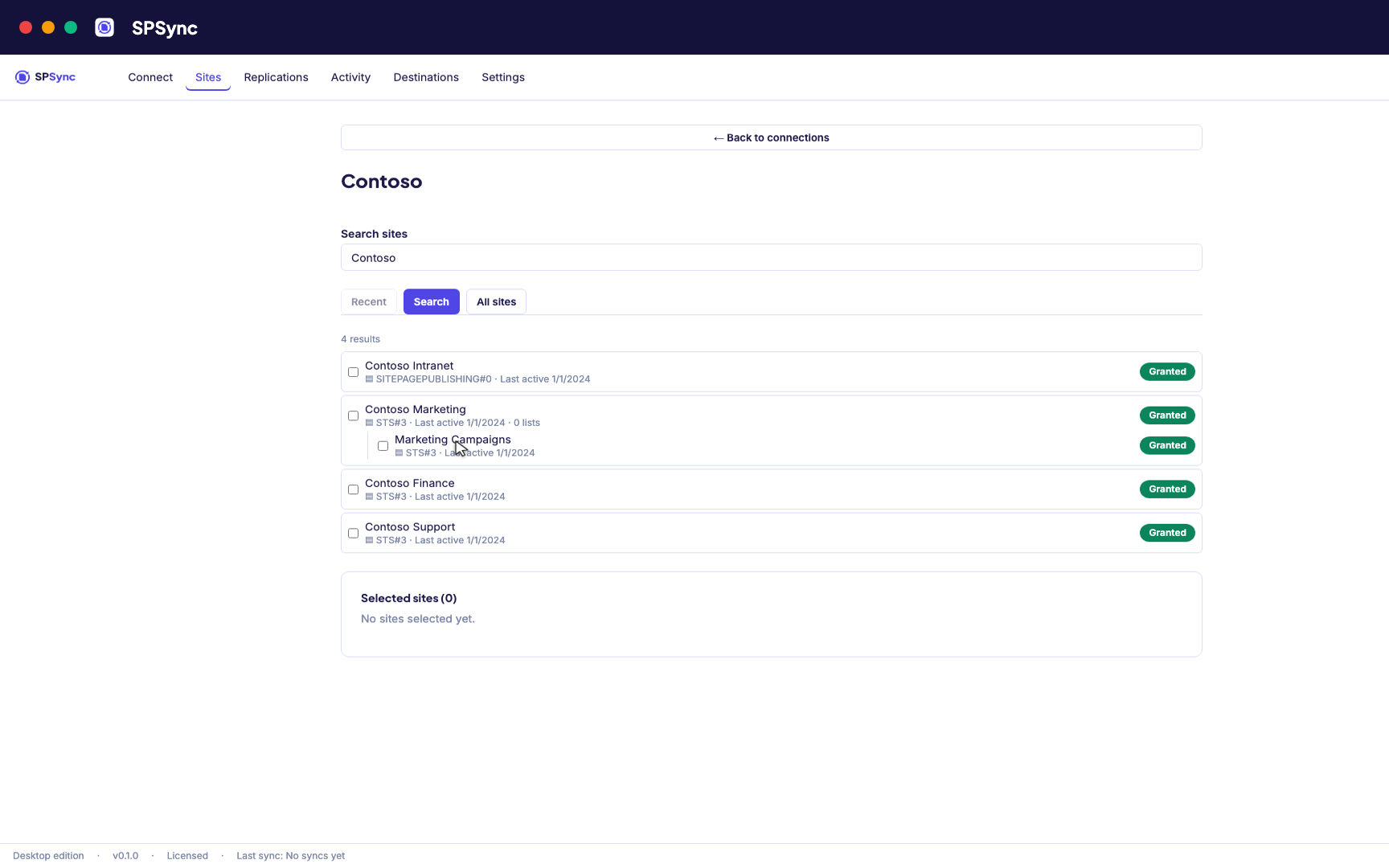
Sign in with Microsoft, then find a site by name or URL, including subsites. -
02
See what you are replicating
SPSync shows every list and library on a site, with its columns and item counts, as soon as you pick a site. You can check what you are about to replicate before you tick anything.
-
03
Choose lists and libraries
Tick individual lists, pick by a name pattern, or sync the whole site so new lists are picked up automatically. The same options work at any level of the site hierarchy.
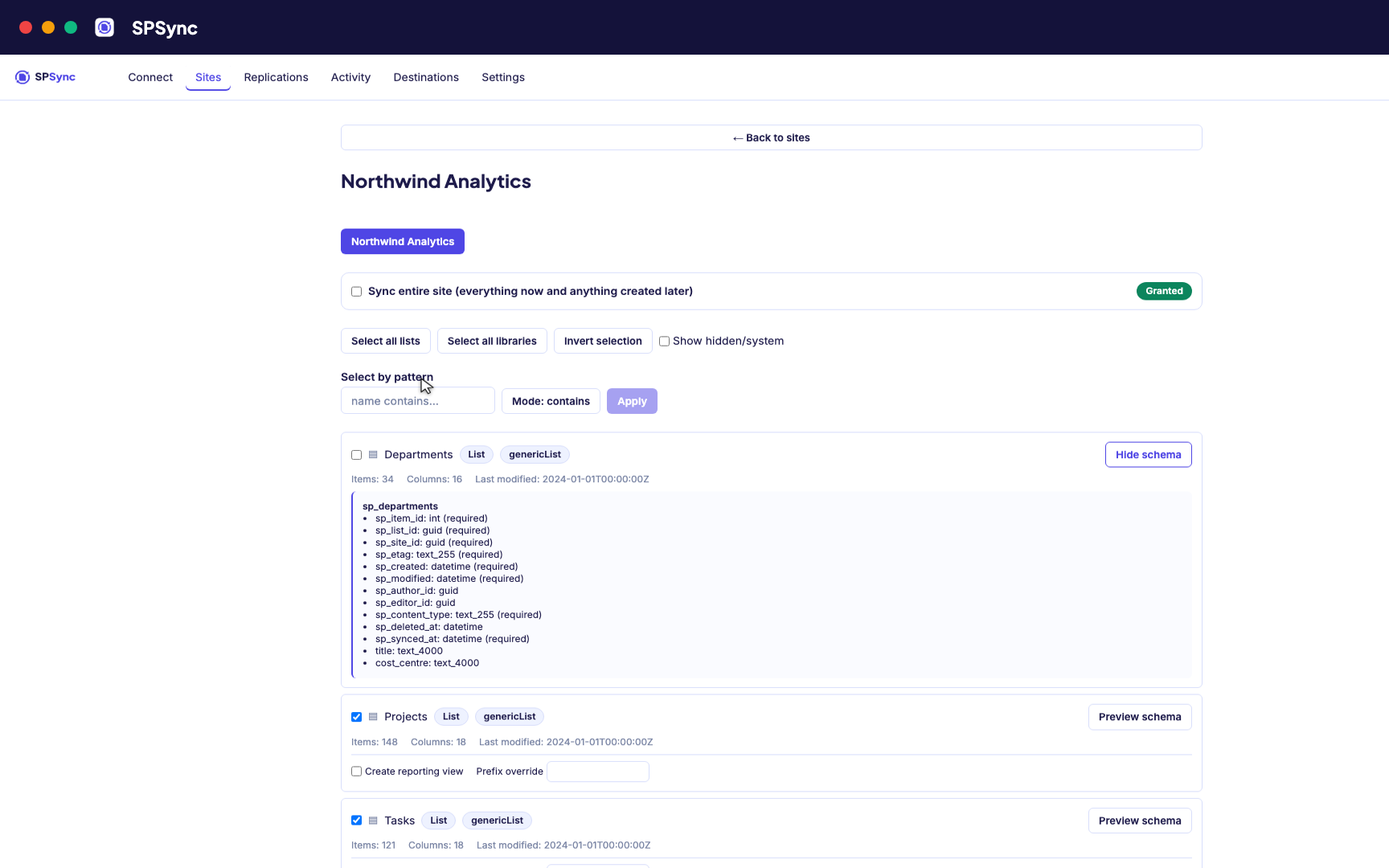
Tick lists individually, pick by name pattern, or sync the whole site, with a schema preview. -
04
Connect PostgreSQL
Point SPSync at PostgreSQL and test the connection before you commit. SPSync generates and maintains the tables, so there are none to create by hand.
Destination setup guides · If the test fails: troubleshooting
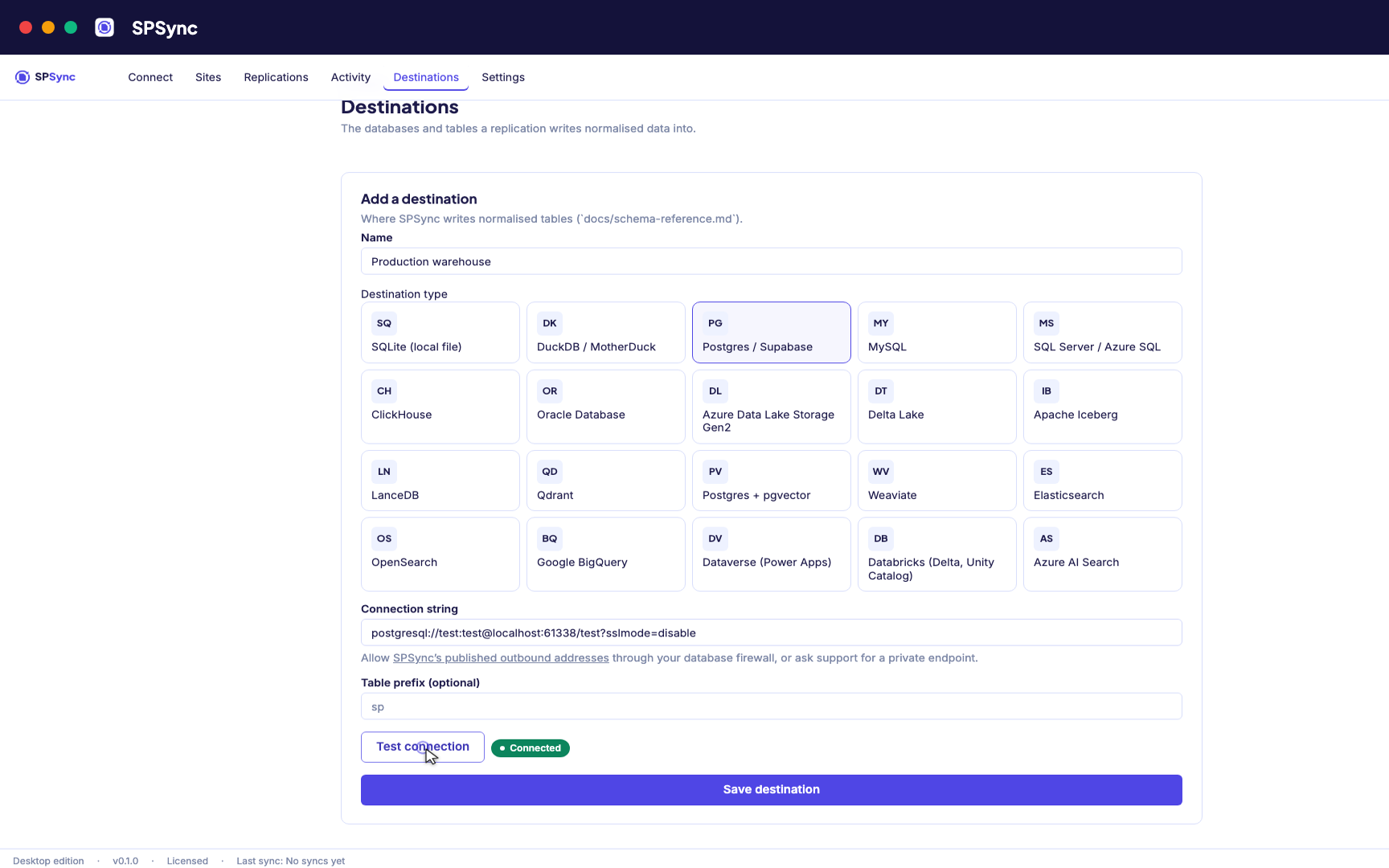
Point at your database. Test the connection, then SPSync creates and maintains the schema. -
05
Run and keep it in sync
A full load first, then deltas on your schedule with a reconcile behind it, weekly by default. Throttling and list view thresholds are handled for you, lookups arrive as keys, and deletes are kept.
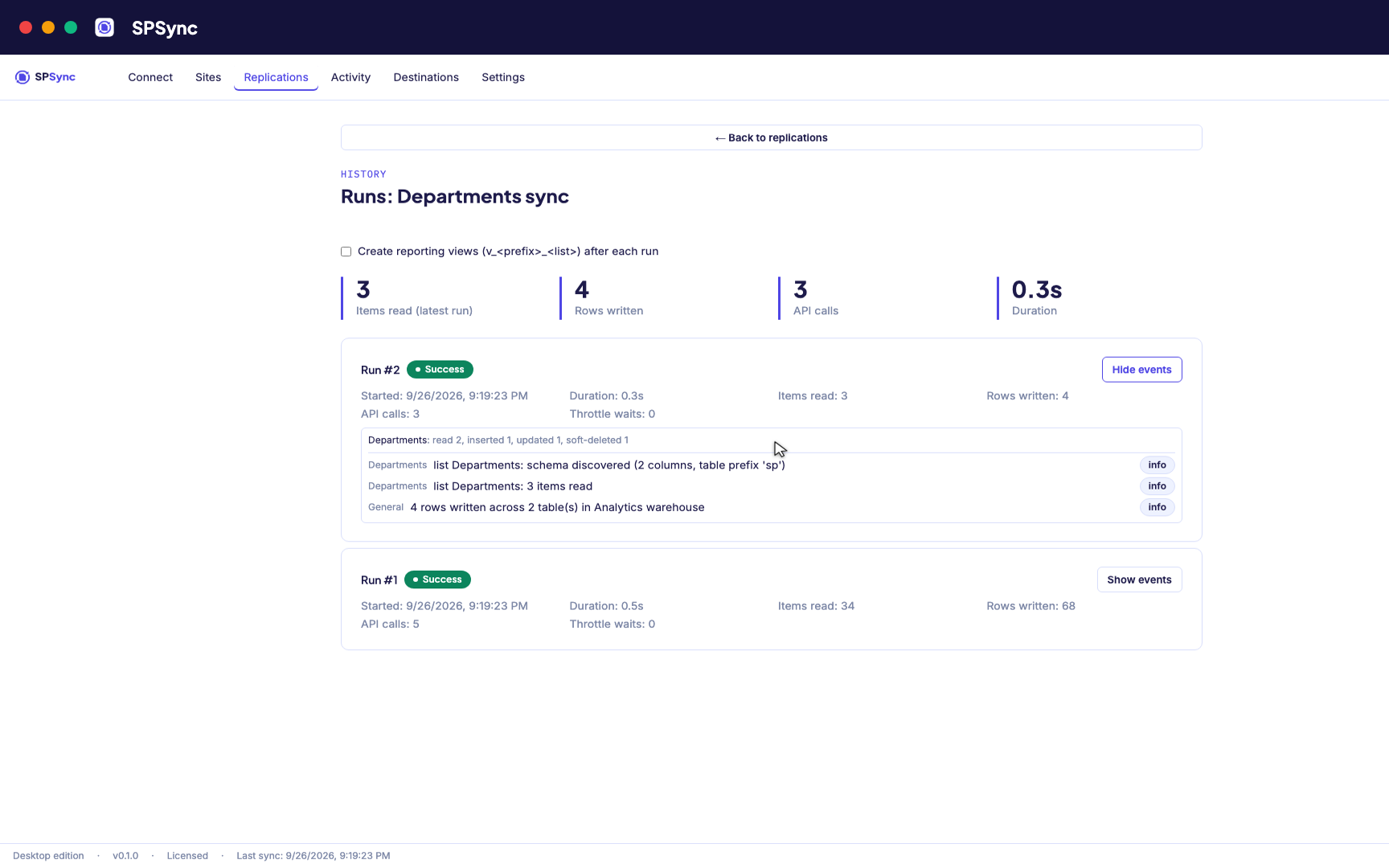
Every run's per-list counts: rows read, inserted, updated and soft-deleted. -
06
Bring sites together and report on it
Replicate many sites into one database, with generated reporting views ready for Power BI DirectQuery on SQL and warehouse destinations. The same tables give any other application a stable SQL interface.
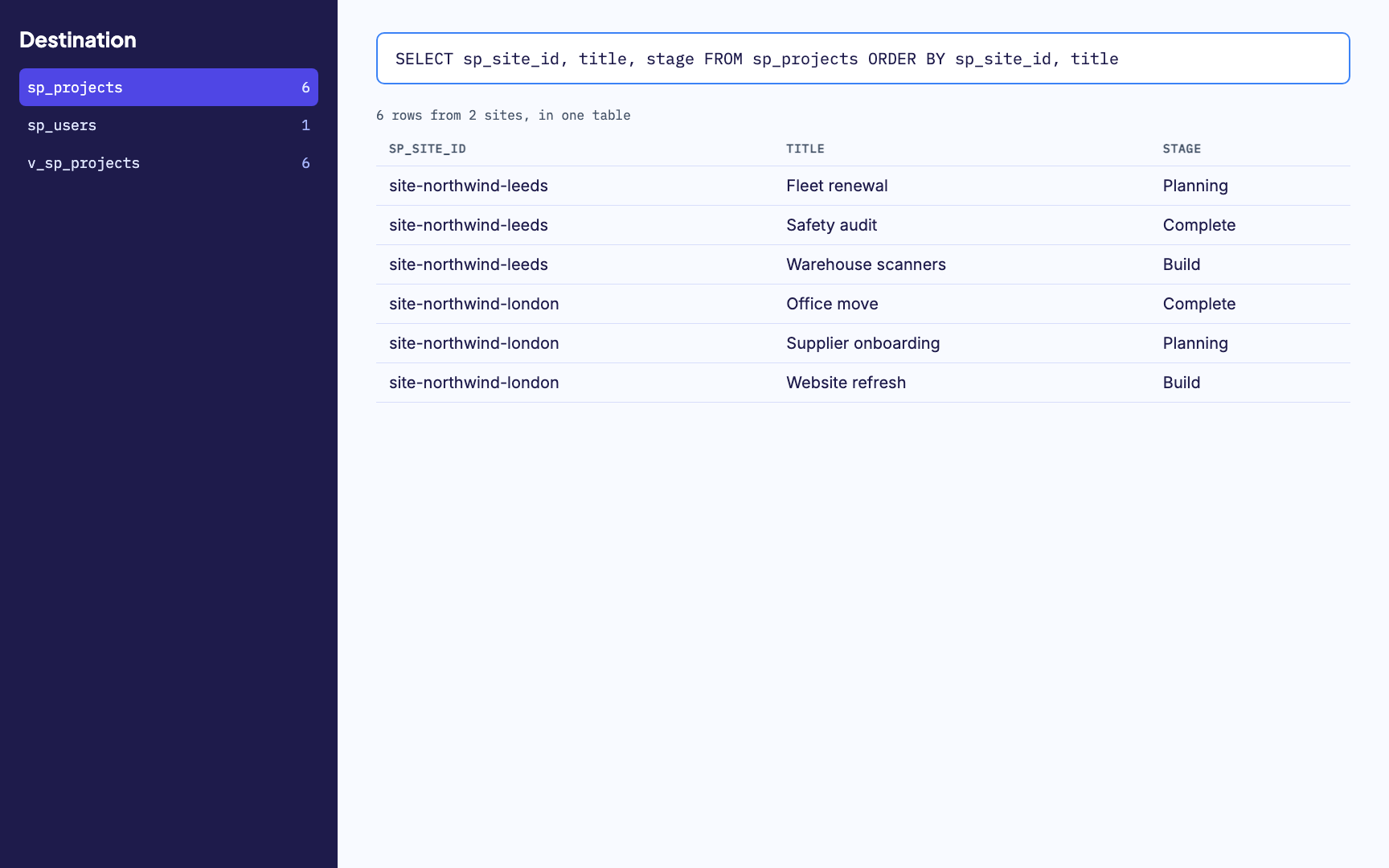
Many sites merged into one table, with a generated reporting view alongside. -
07
Watch it run
Activity and run history sit in one place, with every error named by column. From any run you can send us its diagnostics when you want help with it.
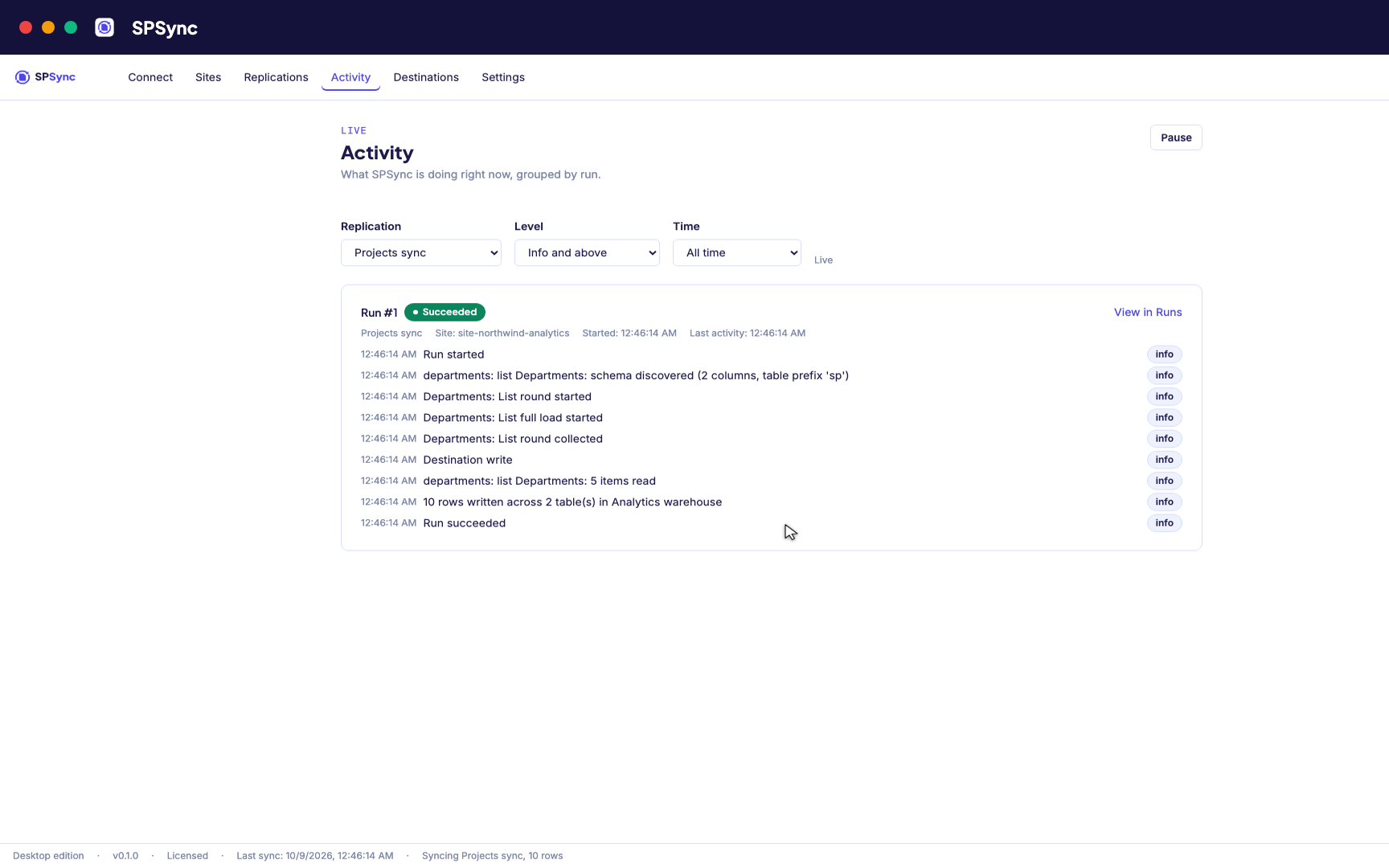
Activity: every run's own steps, live, grouped by run.
Access and data flow
How SPSync touches your tenant and your database
SPSync reads from SharePoint and writes to the Postgres you point it at. That is the whole data path.
It runs where you put it
The desktop app runs on your machine and the command line on your own server. SPSync in your Azure, a managed application for your own subscription, is deployed with you on a call while the Marketplace listing is prepared. Nothing SPSync controls sits between SharePoint and your database.
Read permissions only
SPSync asks Microsoft Graph for read access only. No code path creates, updates or deletes a SharePoint item.
Approved site by site
Unattended runs use app permissions granted per site with Sites.Selected, so an admin chooses each site SPSync can read.
A pack for your admin
The first-run wizard explains each permission in plain language and produces a one-page summary your admin can review before approving anything.
A record of every run
Run history shows the rows read and written, and an error names the list and the column it came from.
Your data stays with you
Nothing from SharePoint or your databases is sent to SPSync. Licence activation and any diagnostics you opt into are the only calls it makes.
An agent reads the database copy
An AI agent or Copilot Studio grounded on the copy connects with a database login and holds no Graph permission. SharePoint item permissions are not copied, so the database role and row-level security decide what it sees.
The security page covers the permission model, the data flow and the throttling policy in full.
Common use cases
Further reading
Frequently asked questions
Does SPSync create foreign key constraints?
No. Each table gets a primary key, and every lookup or person column gets a key column to join on, such as client_id or owner_user_id. No constraint ties those columns together, so rows can arrive in any order without failing a run. Once the schema has settled you can add constraints yourself.
What happens when a list gets a new column, or a column is deleted?
A new column appears in the table on the next sync. Columns removed in SharePoint stay in Postgres, so downstream queries keep working. A column retyped in a way SPSync cannot convert safely gets a new _v2 column, and the original keeps its history.
What happens to items deleted in SharePoint?
The row stays and its sp_deleted_at column is set, so a report can show deleted items or filter them out. To remove the row instead, set deletes: hard on that replication in the command-line tool's YAML config. Runs from the desktop app and from SPSync in your Azure always keep the row.
Does this need a special Postgres extension or version?
No. SPSync writes plain tables with standard types to any reasonably current Postgres, self-hosted or managed, and needs no extension. The pgvector destination is the exception: it needs the vector extension and PostgreSQL 15.
Can an AI agent or a text-to-SQL tool query the Postgres copy?
Yes, with a database login. Give it a read-only role on the tables or views it needs and point a Postgres MCP server or the tool's own SQL connector at the replica. The agent gets lookups as key columns and multi-value columns as child tables, and it never calls SharePoint. Row-level security on the replica decides what it sees, because SharePoint item permissions are not copied.
Next step
Talk to us about PostgreSQL
Bring a list your application needs and we will replicate it into a Postgres database with you on a call. The desktop app fits a developer's machine and the command line a server or a CI job. SPSync in your Azure, a managed application for your own subscription, is deployed with you on a call while the Marketplace listing is prepared. For how seats and target families are counted, see how licensing works.
Book a call to talk through your use case, see further walkthroughs or demos, and set up a trial in your own environment.